Gh0stCringe RAT analysis
As exercise, I’ve decided to find a malware sample on MalwareBazaar to analyze. I was looking for a Windows malware written in C/C++, so I chose the sample described in this post. This is not a new threat on the web and after the analysis, with more knowledge about its functionalities, I can say that, probably, it’s a variant of a Ghost RAT malware, known as Gh0stCringe.
Introduction
The sample is documented at this link and here are some details:
| Name | SHA-256 |
|---|---|
1.exe |
04795669ada92df9a0361b6e169be7b6c23c888f6a56a96c35bd8cd4c09cd6c9 |
This malware is a standard PE, it’s not obfuscated but it contains an embedded DLL protected by two different encryption layers, in order to bypass antiviruses and EDRs detection. Once decrypted, the DLL is injected into memory and executed. In fact, it’s the DLL to perform all the malicious operations this malware does. In this post I’ll share a deep dive on these binary files.
Dynamic analysis
First of all, i ran the executable to try to understand what it did. The execution environment was composed by 2 VMs, isolated inside the same internal network, without Internet access. These machine were:
| OS | IP | Role |
|---|---|---|
| Windows 10 | 10.0.0.2 |
Victim’s machine |
| Kali Linux | 10.0.0.1 |
GW and DNS (fakedns) for the first VM |
Once executed, i’ve seen that the malware tried to send some data to the 156.236.72.163 address, to port tcp/8000:
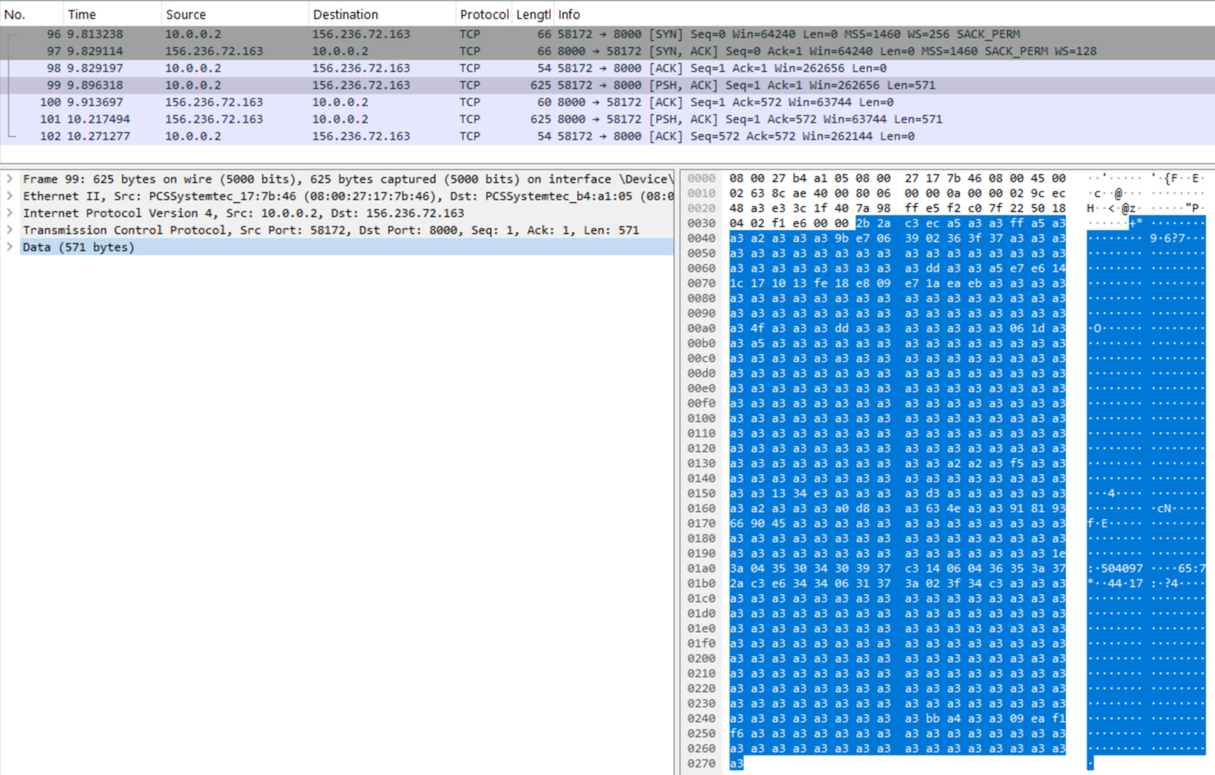
The data appeared encrypted in some way, but the repeated a3 bytes looked suspicious, as they suggested an encryption method using this single byte XORed through all the data. Trying to perform a XOR with a3 resulted in another incomprehensible bunch of bytes, so there should be another encryption layer.
Another action this malware did was set persistence. This was obtained modifying the registry key HKCU\SOFTWARE\Microsoft\Windows\CurrentVersion\Run\(Default). In this way the malware would have been executed on every machine reboot.

Among all the registry operation, it jumped out a failed attempt to create a service. So, probably, this malware tried different techniques in order to obtain persistence:

As you can see in the image above, the malware tried to create a service named Rsoyac uyuyscoi but since it did not have enough privileges, the access to the registry key resulted in an access denied error.
I did not notice others signals that jumped out during the malware execution. In addition, and sadly, i discovered that the C2 server the malware tried to send data to, was not reachable anymore, so it was impossible to analyze the interaction between this malware and its remote server.
After this quick session of dynamic analysis, i’ve decided to start with a deeper static analysis, trying to do some reverse engineering in order to unveil its hidden details.
Static analysis
Loader analysis
The file 1.exe is a 32-bit malware written in C++. It is not packed, but its import table does not contain all the functions it uses while running, since it only imports KERNEL32.dll.
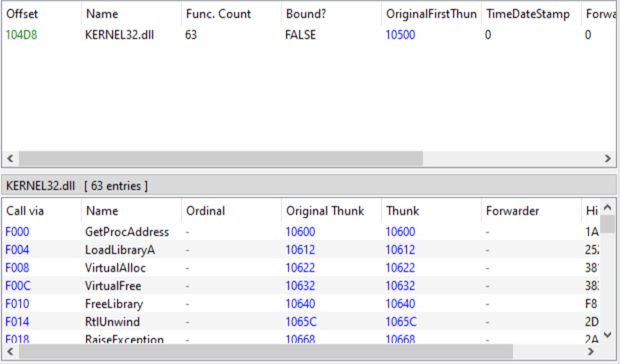
Note: the sample was loaded in a disassembler at base address 0x00400000, so all the addresses reported below are relative to this base.
Once imported the sample into IDA and disassembled, it was possible to note that the WinMain function is a wrapper of another function, the one that really does something. I’ve called this function real_main:
push    ebp
mov     ebp, esp
push    offset aStudyhard ; "StudyHard"
call    real_main
add     esp, 4
xor     eax, eax
pop     ebp
retn    10h
In different points of the code, an obfuscation technique based on C++ exception was used. However, IDA correctly handled them quite well, and in points where it was not clear the next instructions executed, using a debugger solved the problem.
The real_main function calls two interesting functions. Each of them takes, among other arguments, an address pointing to the start of a long byte buffer, and both functions perform operations on these bytes. This address is 0x0041105C, and it is likely encrypted, with these functions responsible for decrypting it. I’ve named them decrypt_1 and decrypt_2.
decrypt_1 takes as argument the address of the encrypted buffer, the size of it and a seed used to derive the key used to perform decryption operations. It can be summarized in this way:
for(int i = 0; i < size; ++i) {
  buf[i] = ( (buf[i] ^ key) + key )
}
where key == 0x7a, derived starting from the seed 0x4381 using the following code:
mov     eax, [ebp+seed]
and     eax, 0FFh
cdq
mov     ecx, 5Fh
idiv    ecx
add     edx, 58h
mov [ebp+key], dldecrypt_2, instead, seems to be an implementation of the (XX)TEA algorithm, due to the presence of the constants 0x61C88647 and 0x9E3779B9. This function takes as argument the key (an array of integer [8, 0, 8, 1]), the buffer length negated and the address to the buffer to decrypt. I did not spend time to analyze this function, since i was more interested to the content of the buffer once decrypted. So, using a debugger, i’ve checked the buffer once both of the decryption functions terminated their execution.
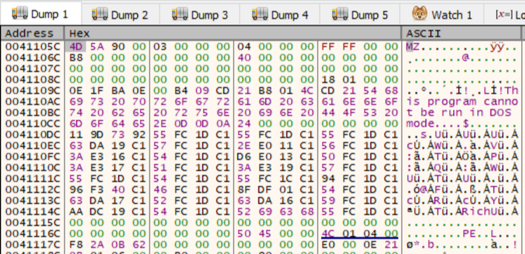
The initial MZ bytes and the subsequent message This program cannot be run in DOS mode suggested that this buffer contained an executable. In fact, once extracted, it was evident that this was a DLL. The rest of the malware code manually injects this DLL in its address space and transfers the execution to it. This injection is performed using standard functions like VirtualAlloc and VirtualProtect, whose addresses were recovered through the usage of LoadLibrary and GetProcAddress.
At offset 0x00401843 there is the call instruction to pass the execution to the DLL entry point.
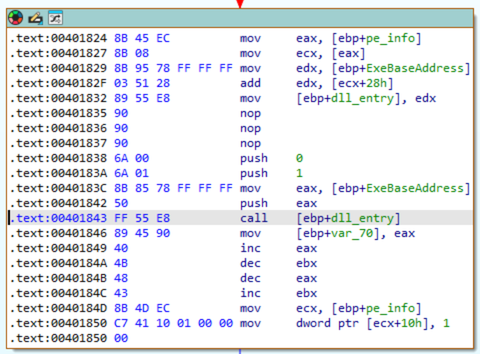
Although the DLL exports a function named StudyHard, it is never called because execution is transferred directly to DllMain. Nevertheless, StudyHard is identical to DllMain, so nothing would have changed by running it instead of DllMain.
From now on, i will show the analysis performed to the extracted DLL.
DLL analysis
First of all, it seems this DLL has an hardcoded configuration to make the malware behave in a certain way. During this analysis i will focus more on the configuration present on the sample i have.
As for the loader, I’ve imported this DLL in IDA using 0x10000000 as base address, so all the addresses are relative to it.
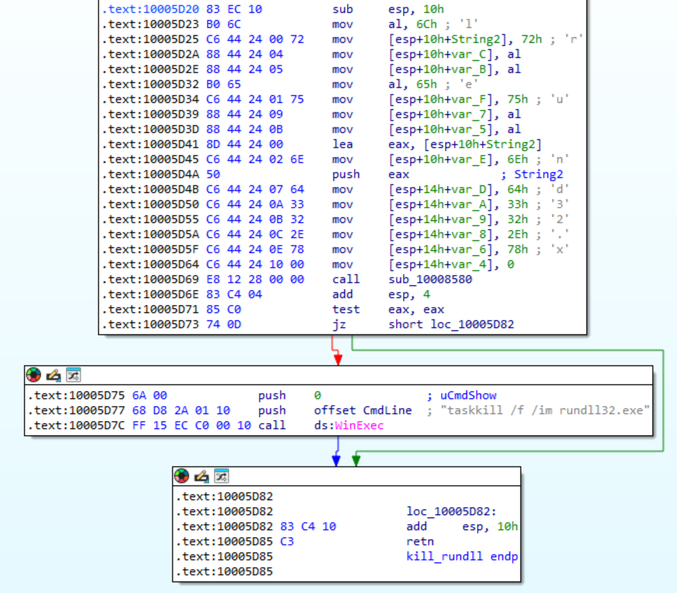
Starting the analysis, the first action this malware is configured to do is to retrieve the PID of its parent process. If it is 0, the malware terminates. Otherwise, the malware is configured to kill any running instance of rundll.exe, as an attempt at an anti-debug techique. This is done by the function call at address 0x10005D7C:
Subsequently, another flag is checked to see if the malware should download a file from Internet. In this case my sample was not configured to do it, so i pass over these instructions. After that, the configuration makes it call GetVersionExA in order to retrieve the OS version of the victim’s machine. In particular, the malware is selecting a path based on the Windows version of the machine that is running it. In my case (in the path selected if you are running a Windows 10 machine) at address 0x10007CB5 a thread is created with the only goal to set persistence using the registry key HKCU\SOFTWARE\Microsoft\Windows\CurrentVersion\Run\(Default), as we noted during dynamic analysis.
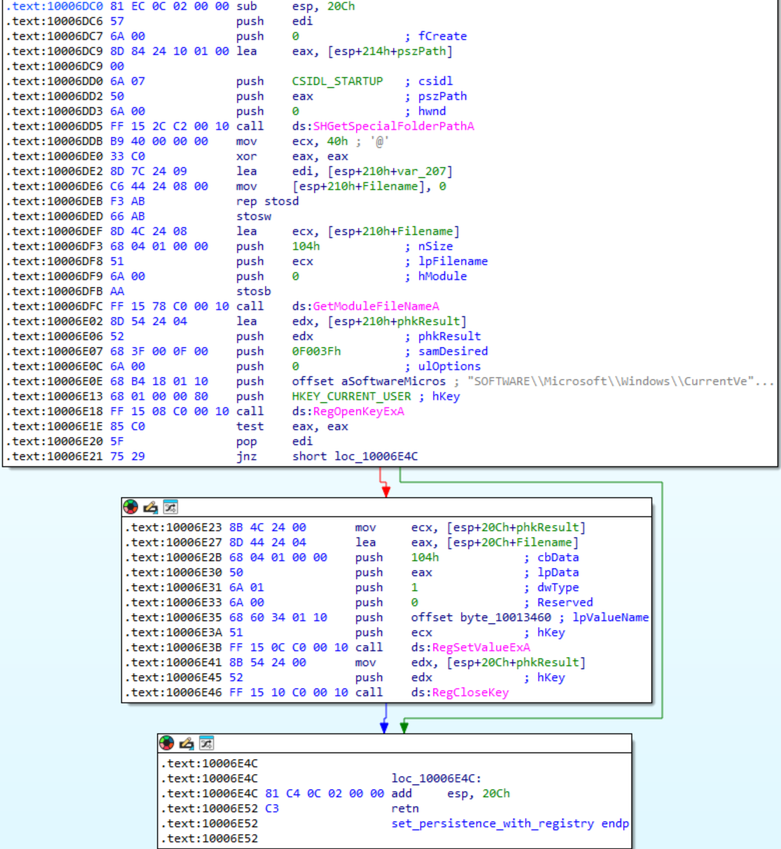
The alternative paths selected when using different Windows versions attempt to obtain the same goal, but using different methods, like the creation of a service. Note that, even in these paths, there is a configuration flag that makes the malware copy itself to C:\Program Files\Nkfkyhs.exe or not.
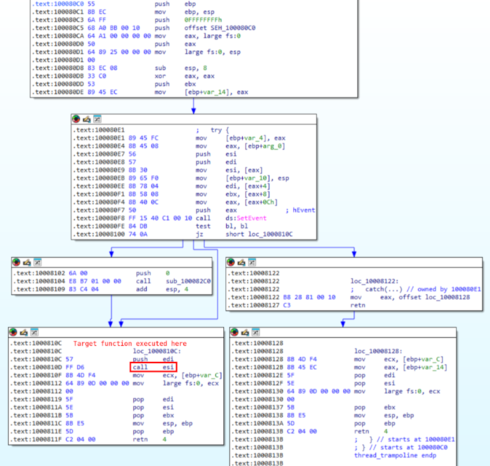
Continuing with the code, another thread is created and this is the responsible for executing all the logic of this malware. Note that, to create this second thread, the malware does not call directly CreateThread, but it uses a wrapper function (renamed in create_thread) that calls _beginthreadex. Here, the malware author tried to do some obfuscation, since the target of _beginthreadex is not the real function the newly thread will execute but a ‘trampoline’ that will execute the real function.
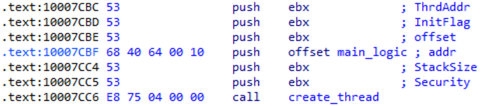
In the following screenshot you can note that create_thread creates a new thread to execute thread_trampoline, with the real function to execute passed as argument. In addition, note the event created that will be signaled inside thread_trampoline, to communicate to the parent that the thread has been created before continuing the execution.
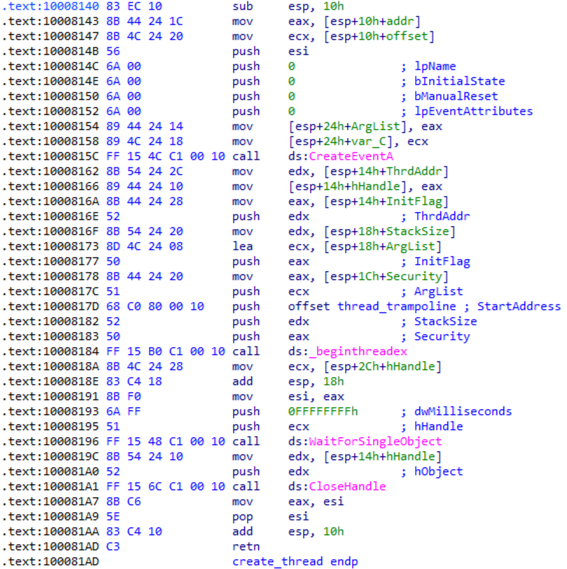
Finally, thread_trampoline takes the real function to run and executes it:
Now, going further the technique used to create this new thread, let’s focus on what it does. First of all, it creates a mutex named 156.236.72.163:8000:Rsoyac uyuyscoi, to ensure that the malware is executed only once, then it tries to set persistence for all users, setting the registry key HKLM/SYSTEM\CurrentControlSet\Services\Rsoyac uyuyscoi. As noted during dynamic analysis, this operation fails due to the lack of the privileges to edit this key. This operation is performed at address 0x10008AE8:
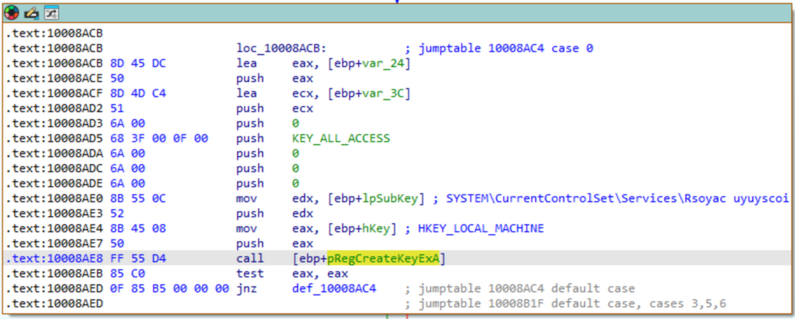
(The function pointer to RegCreateKeyExA used by the call instruction is retrieved previosly in the code with a combination of LoadLibraryA and GetProcAddress).
After that, another configuration flag is checked to determine whether a new thread for keylogging needs to be created. In this case, the DLL is configured to do so, so the thread is created and it’s responsible for performing keylogging and saving all keystrokes to a file named Default.key. This function is located at address 0x100026A0, and you can identify it as a keylogger by examining the calls it makes.
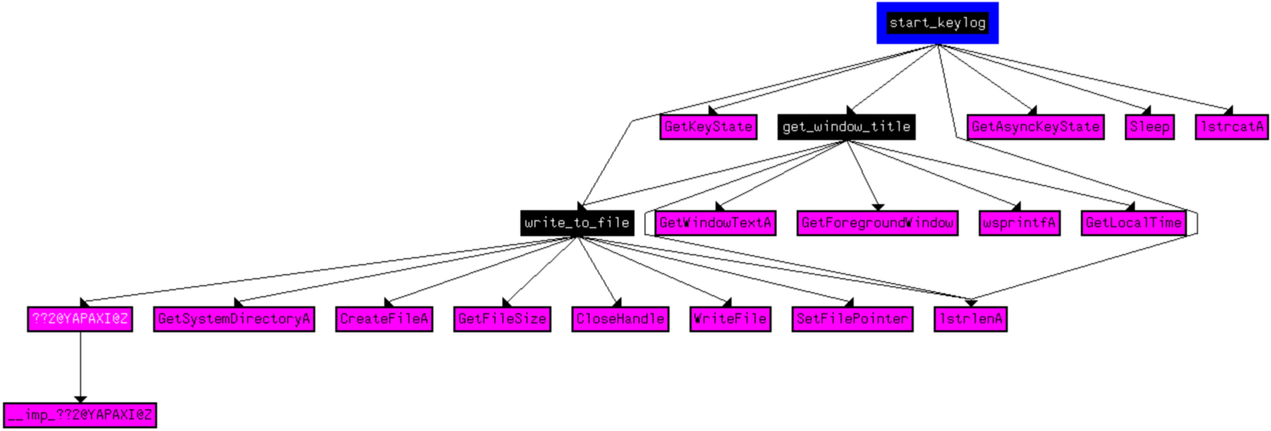
The functions get_window_title and write_to_file were renamed by me after analysis.
The file containing all the keystrokes is stored at C:\Users\<username>\AppData\Local\VirtualStore\Windows\SysWOW64\Default.key, even through the code calls GetSystemDirectoryA. This happens because the malware does not have the privileges required to write to the C:\Windows\System32 folder. As a fallback, Windows File Virtualization redirects the write attempt to VirtualStore, a per-user folder where unauthorized writes to protected system locations (such as C:\Windows\System32) are stored instead.
I had not noticed this file during the initial dynamic analysis, but when running the malware again, the file was indeed written:

However, the content of this file is encrypted in some way:
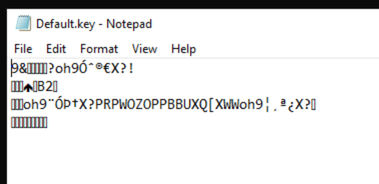
This because, inside write_to_file() function (at address 0x10002450) each byte is XORed with 0x62 before being written:
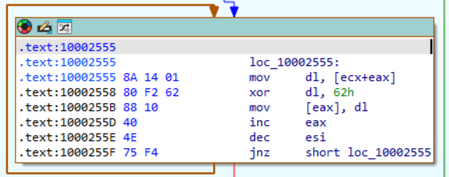
In fact, doing the XOR again unveils the file content:
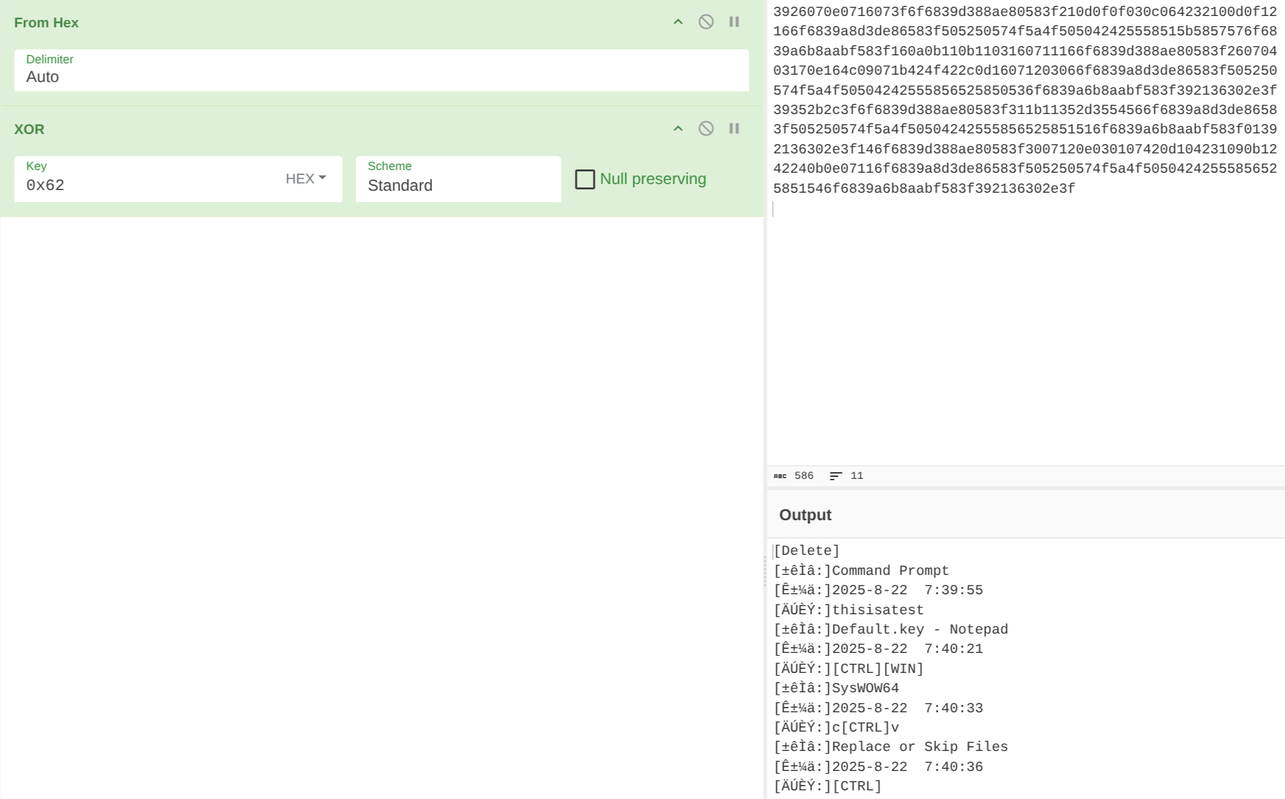
The characters between the square brackets should be asian, but since i’m using a different locale they aren’t displayed correctly.
After the keylog thread creation, the DLL establish a TCP socket to the C2 server (IP: 156.236.72.163, port tcp/8000) through a function i’ve renamed connect_to_host(). The call instruction is located at address 0x1000668E and this function, in addition, creates another thread to receive and manage the response from the server. I will analyze this part later.
It’s important to note the call at address 0x100066BA, since, in the function called, a pointer is stored in a class previously created. This pointer is located at address 0x1000C30C and it seems to be the vtable for the class. This will return during the C2 response analysis, where these functions are selected based on what the C2 server sends to the malware.
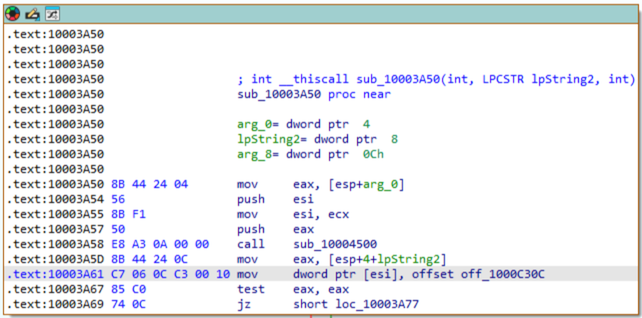
So, after the socket creation, the malware sends the first message to its C2 server, to nofify it about the new machine infected. This is performed by the function at address 0x100059D0 and that i’ve renamed in send_data (call instruction at address 0x100066E5). Before send the message, this function gathers data about the infected machine. These data are:
- Machine name (
gethostname()) - OS version (
GetVersionExA()) - Registry key
HKEY_LOCAL_MACHINE\HARDWARE\DESCRIPTION\System\CentralProcessor\0\~MHz - Number of processors
- Physical and virtual memory usage (
GlobalMemoryStatusEx()) - Drive type and free space in each of them (
GetDriveTypeA()andGetDiskFreeSpaceExA()) - Bit of the system (
IsWow64Process()) - Running antivirus
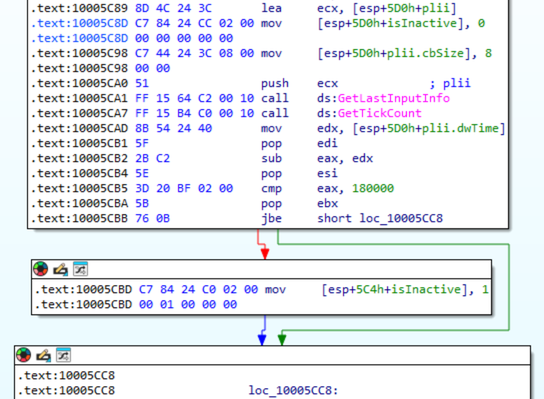
- If the infected PC is inactive (
GetLastInputInfo()andGetTickCount())
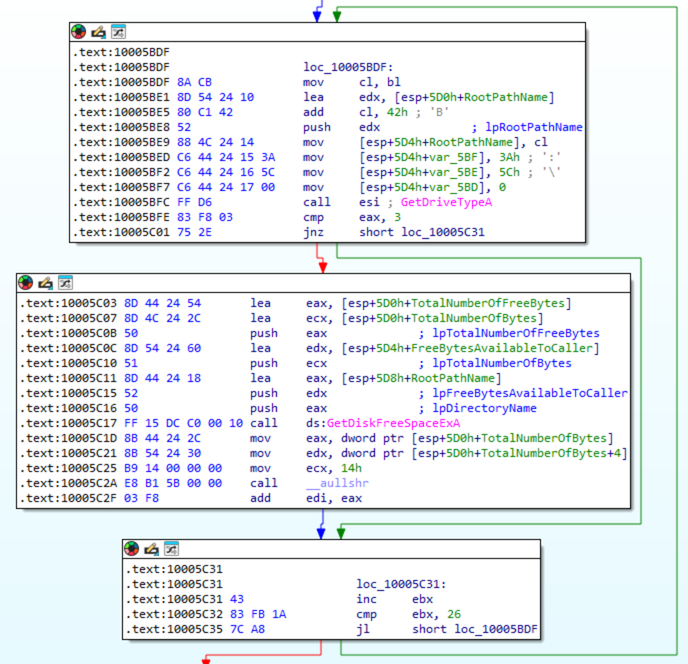
In particular, to check for all drives, the DLL checks for each letter starting from A: to Z: and calls the two functions for each of them:
To detect a running antivirus, the DLL embeds a list of process names known to belong to antivirus programs. Using the CreateToolhelp32Snapshot(), Process32First(), and Process32Next() functions, it enumerates all running processes and checks for matches against its antivirus list.
Finally, to detect if the victim’s PC is inactive, it substracts from the return value of GetTickCount() the value contained by the dwTime member of the plii structure, filled after the call to GetLastInputInfo(). If the result is above 180000 milliseconds (3 minutes), the PC is considered inactive.
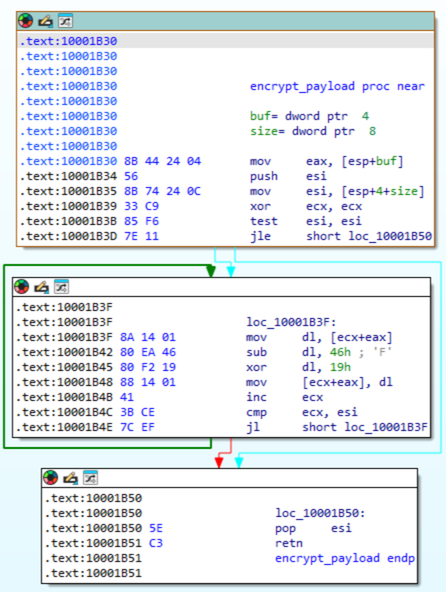
After all the data is gathered, the DLL sends it to the C2 server. The actual call to send() is performed by the function at address 0x10002390. However, as noted during dynamic analysis, the data sent through the socket is encrypted. In fact, always in this function, before sending the payload, the buffer is encrypted with a combination of XOR and subtraction. In particular, the value 0x46 is subtracted to each byte and then each of them is XORed with 0x19:
Reversing these operations (doing first the XOR with 0x19 and then add 0x46) it is possible to obtain the sent data in clear text:
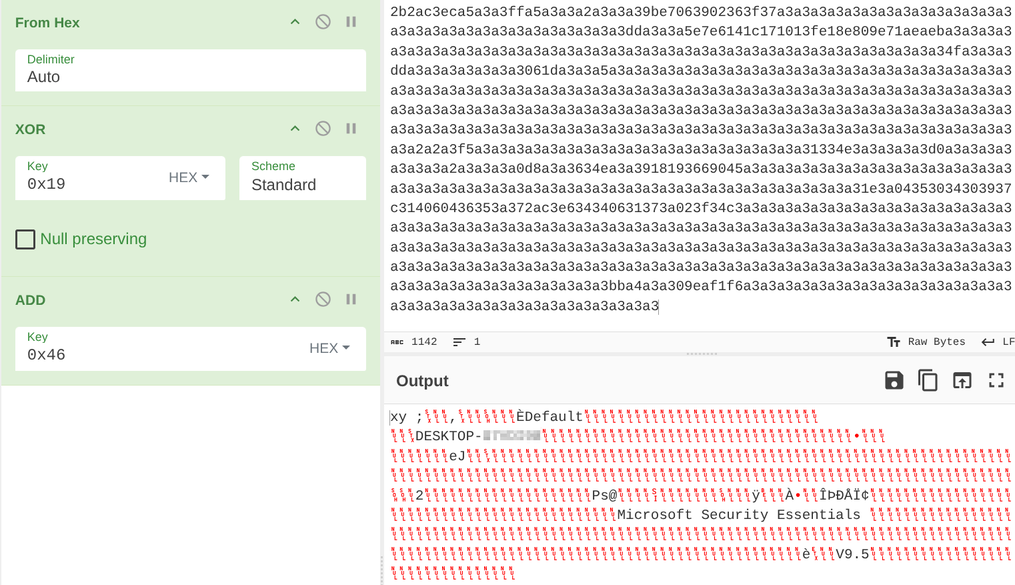
At first glance it is possible to detect the computer name, the number of processors and the name of the antivirus. After the payload is sent, the malware waits a bit before it gathers the data and sends to C2 again, in loop.
Now, it’s time to check what the malware does when it receives messages from the C2 server. Unfortunately, the C2 server seems to be unreachable at the time of writing this post, so it was impossible for me to dynamically debug the malware when a message is received. However, as mentioned previously, Once the DLL creates a socket with the C2 server, the same function creates a thread used to receive and parse message from the server. This function is located at address 0x10001E20 and after the recv() call, it is possible to observe that the received message is decrypted in the same way done to decrypt the sent buffer.
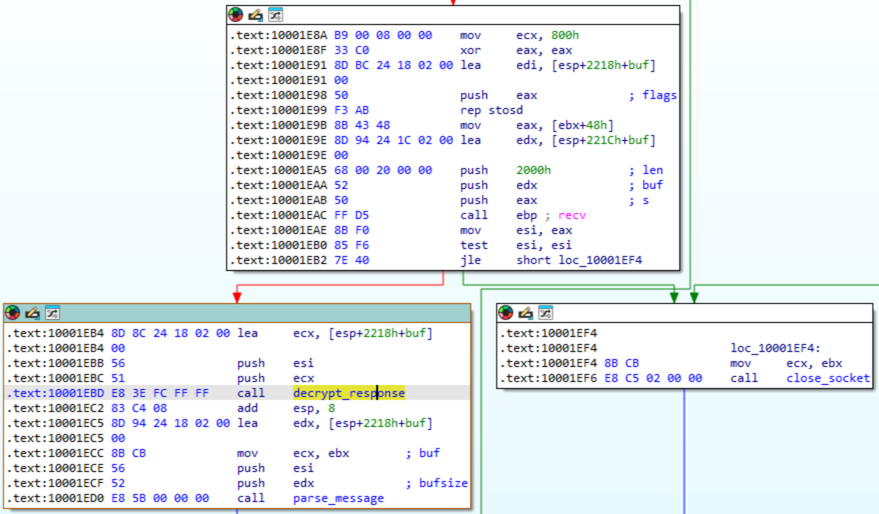
After the decryption, the DLL starts to parse the message, at a function located at address 0x10001F30. Here, the assembly is a bit confusing, especially without the possibility to debug it, but the most interesting part is the call() instruction towards the end of the function, at address 0x10002142:
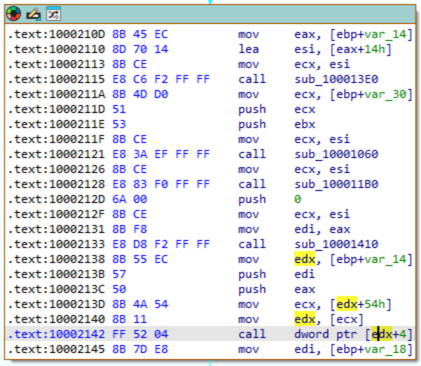
The content of the edx registry is the vtable mentioned early (addess 0x1000C30C) and as you can see from the screenshot above, the second function is called:

I’ve renamed the called function as manage_operation, since it contains a switch case to execute various tasks based on the content of the message received. Probably, the message from C2 server contains a number or something similar that could be used as index to select the right path.
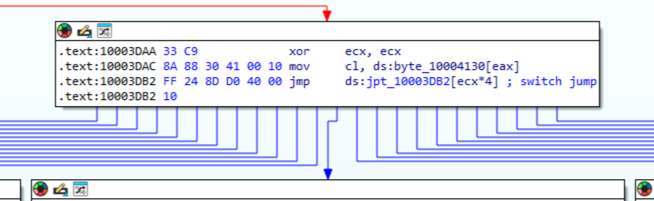
The features this malware makes available are the following (they’re not all the features but the ones i managed to understand):
- Starting the keylog thread and socket creation (even if the malware is configured to not automatically start it while executed)
- Extending malware features, by dynamically loading DLLs
- Trying to elevate its privileges
- Uninstalling itself and remove all traces
- Trying to set the malware as a Windows service
- Showing messages to victim’s machine (using
MessageBoxA()) - Proxy capabilities
- Interacting with the victim’s machine desktop
- Executing shell commands
- Creating files
- List victim’s machine processes
- Enumerating opened windows on Desktop
- Copying itself to
C:\Program Files\Common Files\scvh0st.exeand set persistence modifying the registry keyHKCU\SOFTWARE\Microsoft\Windows\CurrentVersion\Run\(Default)
Conclusion
After gaining knowledge about this malware and searching on Google, i’m pretty sure this malware is a variant of Ghost RAT malware, named Gh0stCringe. The source code of Ghost RAT was release publicly years ago and the only fact that it is public it makes it a good choice as a starting point even today. A lot of variants have been discovered in these years and Gh0stCringe is one of them. Looking at the data sent periodically from the client to the server, it’s possible to observe a V9.5 that could indicate that this is the version 9.5 of this variant.
Among the encrypted DLL, the code obfuscation techniques and the different encryption methods adopted, I found this analysis fun to do. Since this is not a new threat, there are already different YARA rules that detect it. Anyway, here’s IoC table for this version:
| Type | Value |
|---|---|
| File hash (SHA-256) | 04795669ada92df9a0361b6e169be7b6c23c888f6a56a96c35bd8cd4c09cd6c9 |
| File path | C:\Program Files\Nkfkyhs.exe |
| File path | C:\Program Files\Common Files\scvh0st.exe |
| C2 server | 156.236.72.163:8000 |
| Keylog file | C:\Windows\System32\Default.key |
| Keylog file | C:\Users\<username>\AppData\Local\VirtualStore\Windows\SysWOW64\Default.key |
| Mutex | 156.236.72.163:8000:Rsoyac uyuyscoi |
| Service name | Rsoyac uyuyscoi |